
Importing your data
Rather than type everything in, you can import it from a spreadsheet. Deer Track is forgiving about the format — a plain .csv or .xlsx with your columns in any order works.
Import your catalog (providers & services)
Open Catalog (under More) and click Import. Drop your file on the upload box, or Download a template spreadsheet to start from the right shape. A few things worth knowing:
- Any layout works — headers in row 1, columns in any order, only a name is required. Prices can be written any way (1,250.00, €1,250, $250).
- Categories map automatically (e.g. “Hotel” → Accommodation), across Accommodation, Transport, Activities, Meals, Guides, Insurance and Miscellaneous.
- Add a Suppliercolumn and each service is filed under that provider — created for you if it’s new.
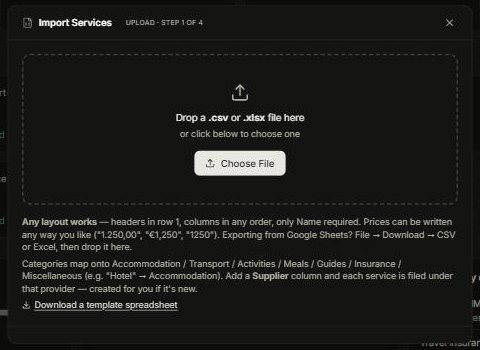
Deer Track then walks you through matching the columns and shows a preview before anything is saved, so you can catch mistakes first.
Import your contacts
Open Contacts and click Import — same idea, with a template for names, emails, phones and companies. You can also Export your contacts to a spreadsheet at any time.
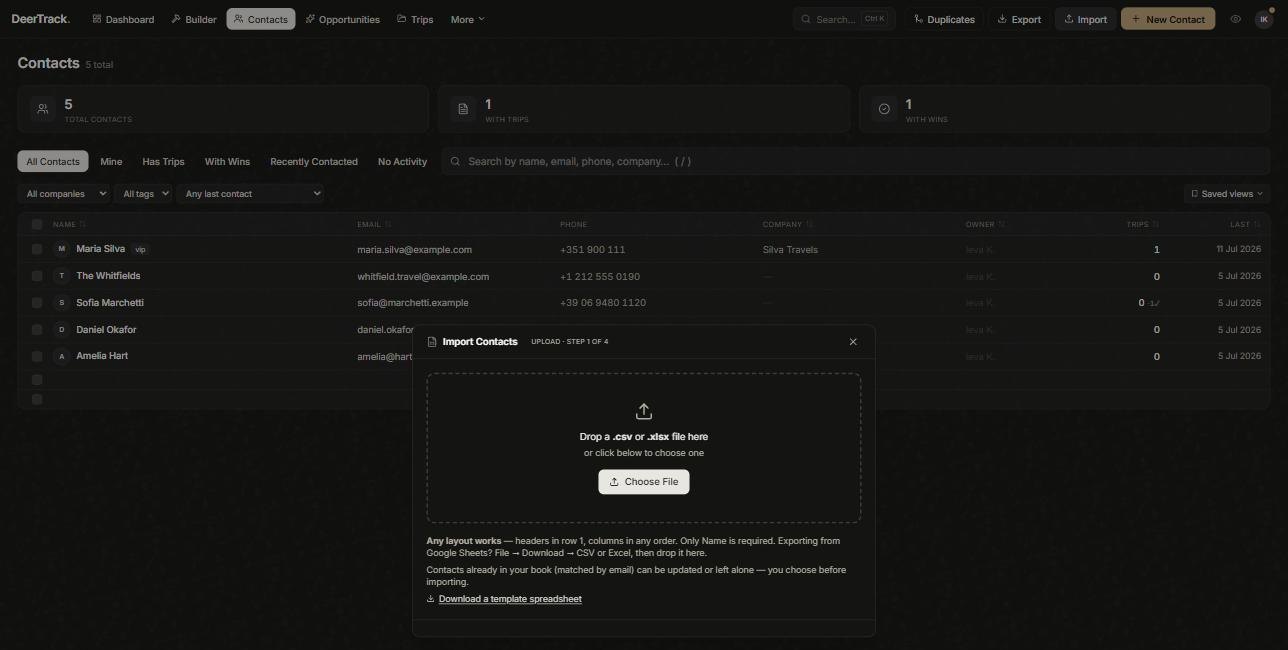
One importer for the whole catalog
You don’t need a different importer for hotels versus guides versus transfers — they all come in through the same Import on the Catalog page. The category files each row under the right type, and the Supplier column groups them under the right provider. Use the in-app Download a template spreadsheet button to get the exact columns, or export your existing catalog, edit it, and re-import to update in bulk.
Coming from another tool?
If you’re switching from another system, you don’t have to do it alone — our team handles the migration of contacts, suppliers and history as part of onboarding. Email help@deertrack.netand we’ll take it from there.
Did this answer it?
If not, a real human reads every email.