
API access & automations
For the more technical: Deer Track can connect to bots, scripts and integrations through an API key. This is an advanced, optional feature — most people never need it.
Create a key
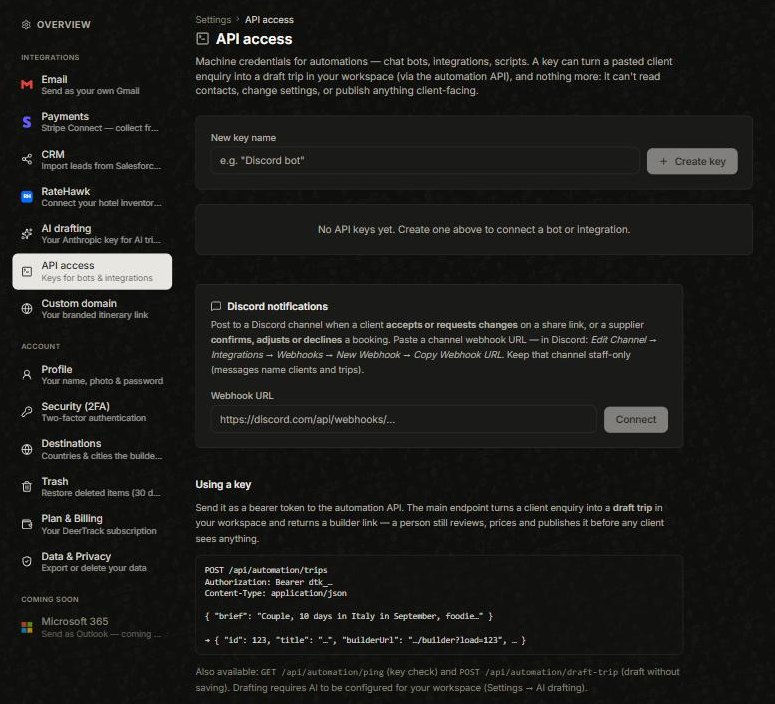
Open the avatar menu → Settings → API access, give the key a name (e.g. “Discord bot”) and click Create key. The secret (it starts dtk_) is shown once — copy it somewhere safe. A key is deliberately limited: it can turn a pasted client enquiry into a draft tripand, only when the request asks for it, publish that trip’s client link — it can’t read contacts, see or change prices, or change settings.
What you can build
The most common use is a chat bot: a teammate pastes a client enquiry (for example a /draft command in Discord), and the bot replies with a drafted trip and a builder link. A person still reviews, prices and publishes it before any client sees anything. (Drafting uses your AI drafting setup.)
Discord notifications
On the same page you can paste a Discord channel webhook to get a message when a client accepts or requests changes on a share link, or a supplier confirms a booking. Keep that channel staff-only — the messages name clients and trips.
Did this answer it?
If not, a real human reads every email.