
Draft a trip with AI
Draft with AIturns a client’s enquiry into a first-draft trip in seconds. It builds the skeleton strictly from your own catalog and never sets prices — you review, price and finish it before a client ever sees it.
Turn it on (once)
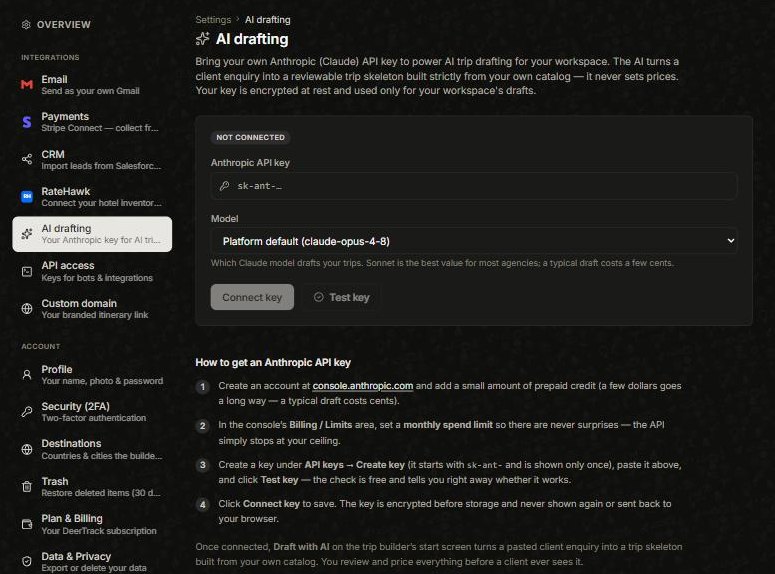
AI drafting runs on your own Anthropic (Claude) key, so you’re in control of cost. Open the avatar menu → Settings → AI drafting and:
- Create an account at console.anthropic.com and add a little prepaid credit (a typical draft costs cents).
- Set a monthly spend limit in the console so there are never surprises.
- Create a key (it starts sk-ant- and is shown once), paste it in, click Test key, then Connect key. Pick a model if you like — Sonnet is the best value for most agencies. Your key is encrypted and never shown again.
Draft a trip
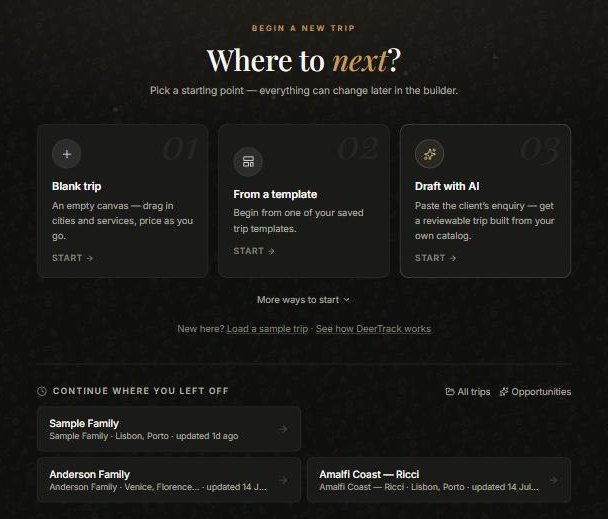
In the Builder, open Begin a new trip and choose Draft with AI. Paste the client’s enquiry — dates, party, style, budget, whatever they sent — and let it draft. It assembles matching cities and services from your catalog into a trip skeleton.
Review and finish
Look the draft over, then load it into the Builder. From there it’s a normal trip — set your pricing, design and share it. Nothing goes out until you send it, so the AI is a fast first draft, not a decision-maker.
Note:only an owner or manager sets the workspace’s Anthropic key. Your workspace may already be able to draft on a shared platform key — adding your own simply moves usage and the spend limit onto your account. Until AI is available, Draft with AI shows a “set up in Settings” prompt and the rest of the Builder works as normal.
Did this answer it?
If not, a real human reads every email.