
Live hotel rates with RateHawk
With RateHawk (Emerging Travel Group) connected, you can search live hotel availability and rates and book real rooms without leaving a trip — instead of keeping hotel prices in your catalog by hand.
What you need first
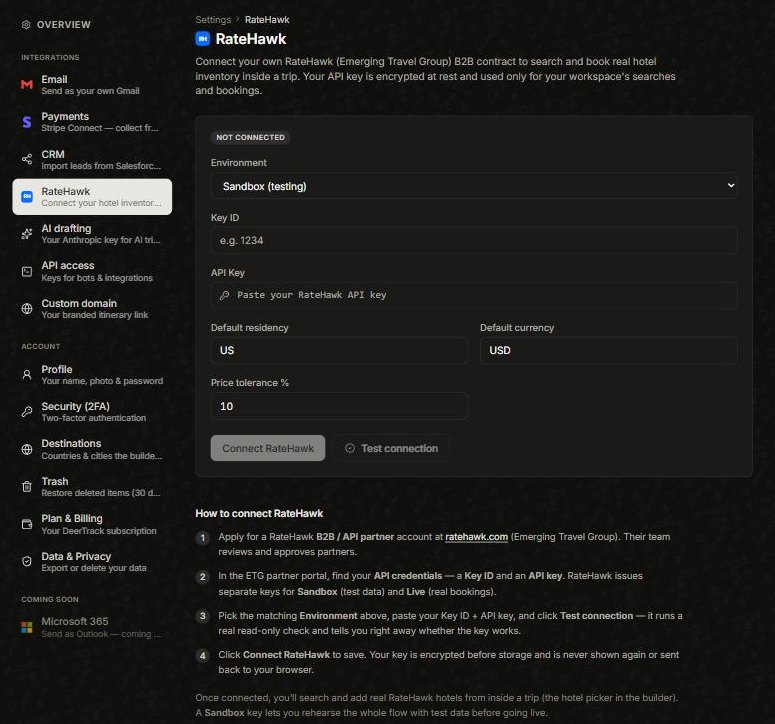
A RateHawk B2B / API partneraccount. Apply at ratehawk.com — their team reviews and approves partners. Once you’re in, the ETG partner portal gives you your Key ID and an API key (separate keys for Sandbox test data and Live real bookings).
Connect it
Open the avatar menu → Settings → RateHawk. Choose the Environment that matches your key (Sandbox to rehearse, Live for real bookings), paste your Key ID and API key, set your default residency, currency and price tolerance, then click Test connection — it runs a quick read-only check — and Connect RateHawk. Your key is encrypted and never shown again. (The organization owner/admin sets this up.)
Use it in the Builder
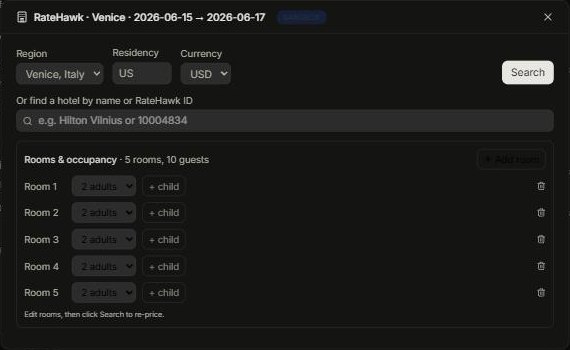
Each city block’s Accommodation row has a Search live rates button. Click it to search live availability for that stay, then Add a room — it drops into the block as the hotel, with its live rate. A badge on the search window tells you the mode: mock (amber — sample data), sandbox (blue — real API, test data) or live(red — real bookings), so a price is never mistaken for something it isn’t.
Book it
Booking is deliberately two steps, so building a quote can never fire a real reservation by accident. Adding a hotel creates a rate quote; you turn that into a booking with Convert to booking in the Builder, or Book via RateHawk once the trip is on the Logistics board. A Sandbox key lets you rehearse the whole flow on test data first.
Note: you can connect and validate your key any time (use Test connection), but live hotel booking also switches on per account — if it isn’t on yet you’ll see a note saying so, and Sandbox still lets you practise.
Did this answer it?
If not, a real human reads every email.